
Cable clutter usually comes from cables having no defined route, no assigned home, and too much loose length. The fix is not to bundle everything together. It is to decide which cables move, which stay, where they should travel, and where spare cables belong.
To organize cables in a home office, first remove unused cords and identify what each remaining cable does. Then separate cables by function, create clear desk-to-under-desk-to-outlet routes, contain the power area, label important cables, and store spare cables separately. The goal is a system that makes cables easy to use and easy to return.
The Cable Organization System

Why Home Office Cable Clutter Comes Back
Cable clutter is often a routing problem rather than a storage problem.
A desk may have a laptop charger, monitor cable, keyboard cable, mouse cable, lamp cord, charging cable, power strip, and several cords running toward the same outlet. If those cables are allowed to follow different paths without a system, the area quickly becomes difficult to use.
Three problems usually create the most visible mess:
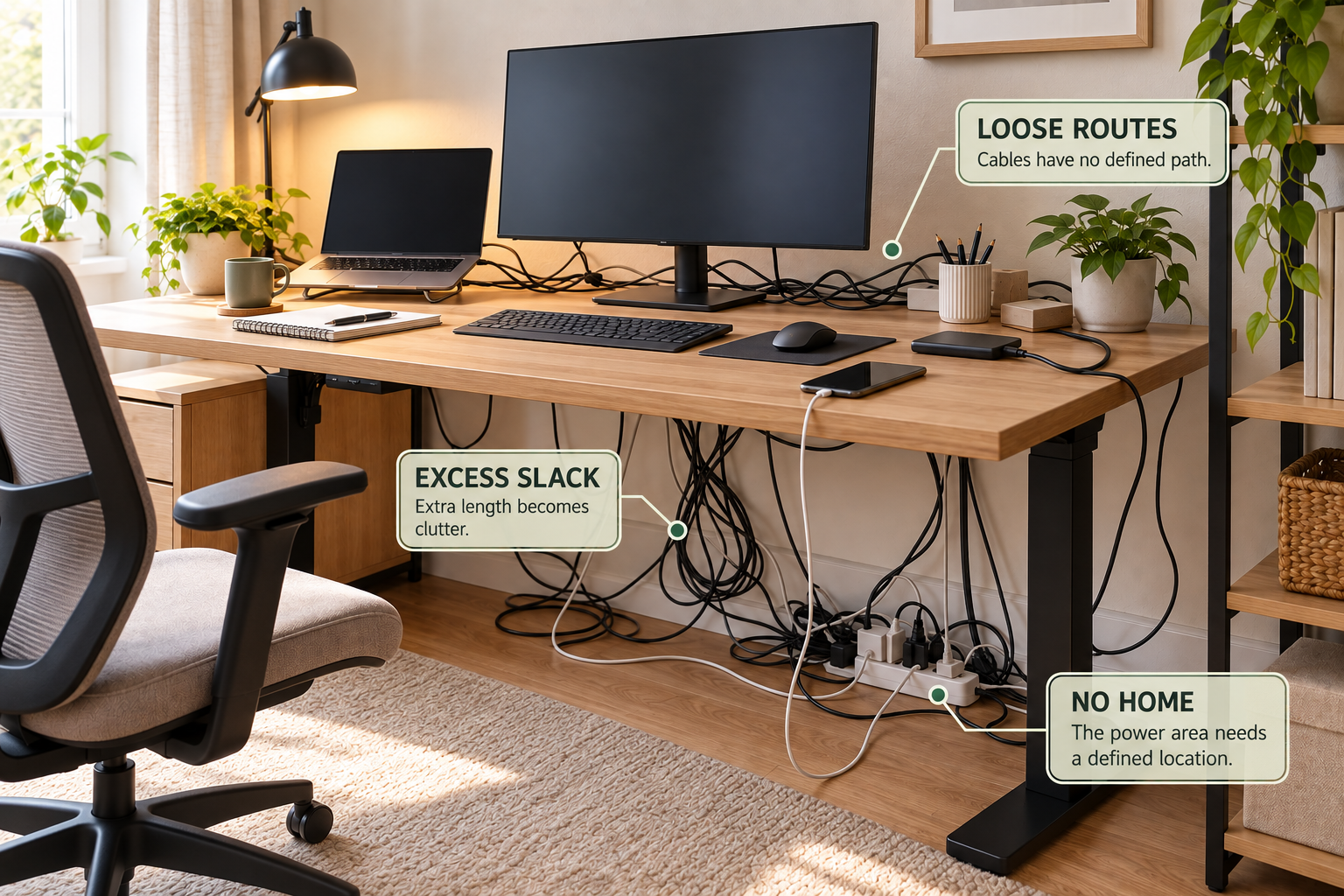
Loose Routes
Cables cross the desk, fall behind the desk, or run across the floor because they have no defined path.
Excess Slack
Extra cable length collects into loops instead of staying controlled near the equipment it serves.
No Power-Area Home
Power strips and adapters become floor clutter when there is no deliberate place for them.
Unknown Cables
Spare and unidentified cords get mixed with active equipment, making future troubleshooting harder.
1. AUDIT Every Cable Before Organizing
Start by unplugging or separating the cables you can safely identify without disturbing equipment that needs to remain connected.
Do not begin by buying cable organizers. First determine what actually needs to stay.
- Separate currently used cables from loose or spare cables.
- Identify what each active cable connects.
- Remove cords that belong to equipment you no longer use.
- Set unidentified cables aside instead of immediately throwing them away.
- Look for damaged cables and handle or replace them appropriately rather than forcing them into the new system.
This step reduces the number of cables you actually have to manage. A smaller cable inventory makes every later step easier.
2. SORT Cables by How They Are Used
Not every cable should be managed in the same way.
A monitor cable that rarely moves has a different job from a phone charging cable that is unplugged several times a day. Treating both the same can make the system inconvenient.
Permanent or Semi-Permanent
Monitor, desktop computer, printer, or other equipment that normally stays connected can follow a controlled fixed route.
Frequently Moved
Charging cables and other frequently handled cords need an easy-access parking point rather than a tightly fixed route.
Shared Routes
Several cables traveling in the same direction can be grouped so they follow one controlled path.
Backup Cables
Rarely used or replacement cables should leave the active workspace and move into clearly identified storage.
3. ROUTE Cables Through Three Zones
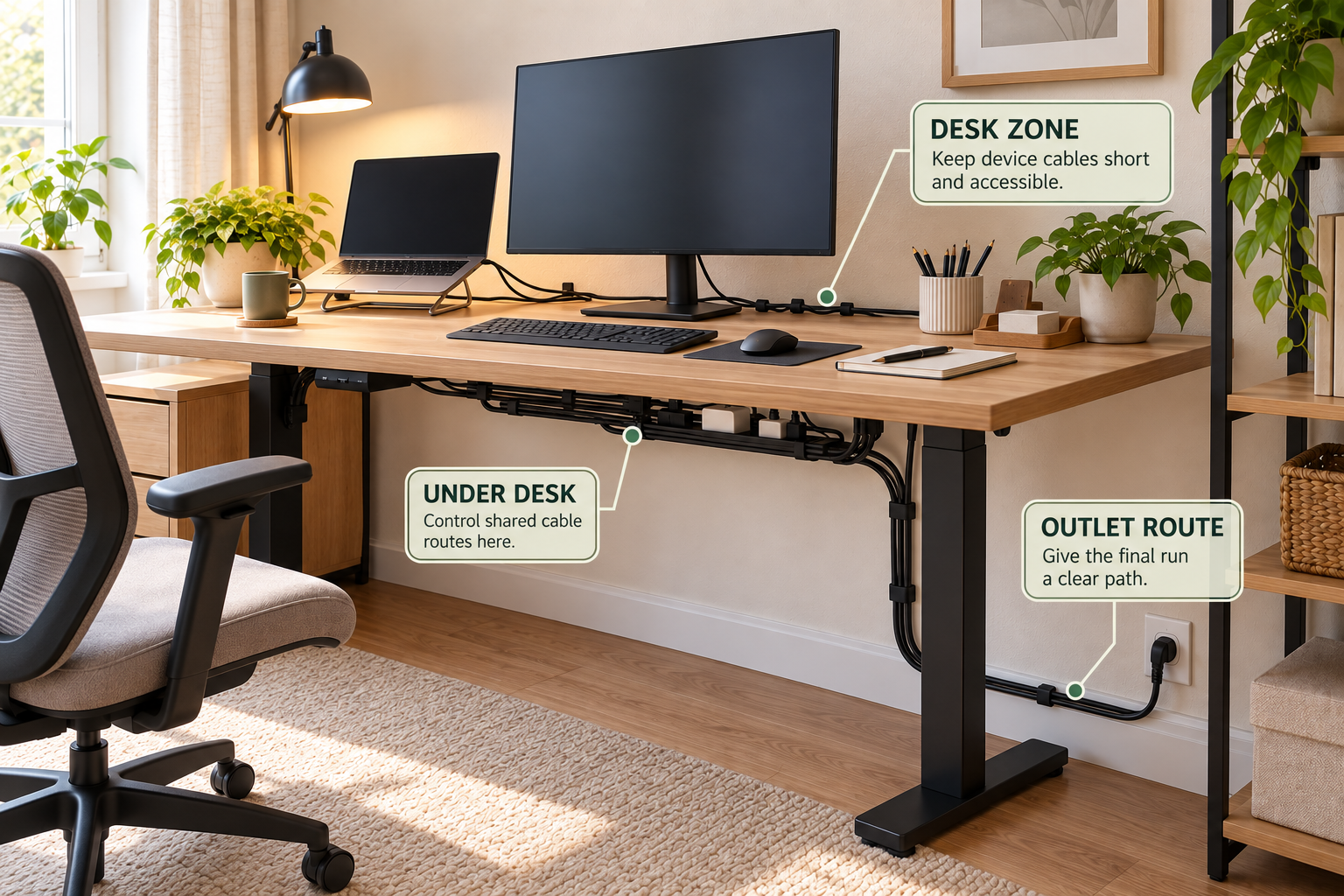
A simple home-office cable system can be divided into three physical zones: the desk zone, the under-desk zone, and the outlet route.
DESK ZONE
Keep device cables close to the equipment they serve and prevent frequently used cables from falling behind the desk.
Why it matters
The desk surface should remain easy to work on. Cables should not become the main visual or physical obstruction.
UNDER-DESK ZONE
Use this area to control shared routes, excess slack, adapters, and the power strip.
Why it matters
Moving cable management below the work surface keeps the desktop clearer without leaving everything loose on the floor.
OUTLET ROUTE
Give the final cable run a deliberate path toward the outlet instead of allowing cables to spread across the floor.
Why it matters
A controlled final route prevents the cable system from becoming messy again between the desk and wall.
Measure Before Installing Anything
- Measure the available space beneath or behind the desk.
- Check where the outlet is located relative to the desk.
- Consider the length and direction of the cables you actually use.
- Leave enough slack for normal equipment movement without creating large loops.
- Keep access to the power area practical rather than burying it behind furniture.
4. CONTAIN the Power Area
The power strip is often the center of home-office cable clutter because several cables converge there.
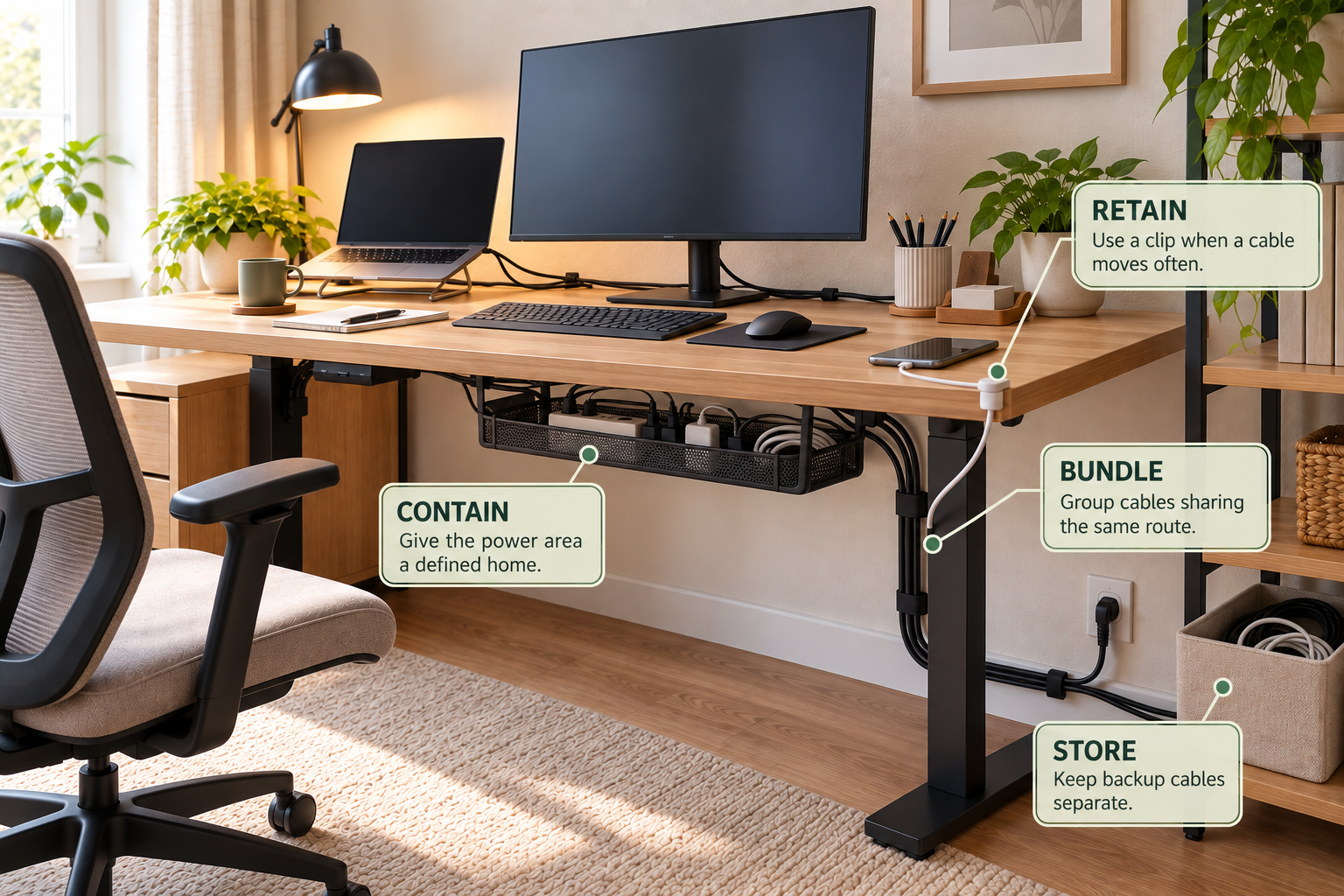
Instead of letting the power strip sit among loose cables on the floor, give the power area a defined location. An under-desk tray can keep the strip, adapters, and bundled cords together while leaving the floor clearer.
Before You Buy a Cable Organizer
- Check the available under-desk space.
- Measure the power strip and adapters.
- Consider whether you need adhesive, clamp, or another installation method.
- Make sure the finished arrangement remains accessible.
- Do not choose a container simply because it holds the most cables. Choose one that fits the actual route.
5. Choose the Right Cable-Management Method
The right organizer depends on what the cable needs to do.
Cable Management Decision Flow
Does the cable move frequently?
Use a simple retention point so it stays accessible without becoming permanently fixed.
Do several cables share the same route?
Bundle or route them together rather than creating several separate paths.
Is the power area creating floor clutter?
Give the power strip and adapters a defined under-desk location where appropriate.
Is a long cable traveling along the desk or wall?
Use a controlled channel or raceway so the cable follows a deliberate path.
Is the cable rarely used?
Remove it from the active workspace and store it with clearly identified backup cables.
6. Two Cable-Management Products That Fit This System
Products should solve a specific cable problem rather than simply add another container. These two options serve different parts of the system.
Scanfield Under Desk Cable Management Tray
Best for: containing a power strip, chargers, adapters, and bundled cords beneath the desk.
This no-screw 17-inch tray is designed to create a defined home for the power area rather than leaving the strip and adapters loose on the floor.
YECAYE Cable Management Under Desk, 6-Pack
Best for: routing cables along a controlled path beneath or around the desk.
The adhesive cable channels are useful when several cords need to travel in the same direction instead of hanging loosely or spreading across the workspace.
Simply Tidy Home may earn a commission when you purchase through qualifying affiliate links. The products above are included because they correspond to specific cable-routing and containment problems discussed in this guide.
7. IDENTIFY Important Cables
Cable organization becomes much easier when you can tell what a cable does without following it through the entire workspace.
You do not need to label every single cord. Focus on cables that are difficult to distinguish or that may need to be disconnected later.
- Label similar-looking cables that serve different equipment.
- Identify important adapters and power connections.
- Keep backup cables separate from active cables.
- Use simple descriptions that make sense later, such as “monitor” or “laptop charger.”
8. STORE Spare Cables Separately
Spare cables should not live in the same active route as cables currently connected to your equipment.
Create a small backup-cable location. Group similar cables together and identify unusual cables before storing them.
Avoid putting every unidentified cord into one large tangled box. That only moves the problem from the desk to the storage area.
A Better Spare-Cable System
- Active: cables currently connected to equipment.
- Frequent-use: charging and other cables used regularly.
- Backup: replacement cables kept for future use.
- Unknown: cables that need identification before being stored or discarded.
How to Organize Cables in a Small Home Office
A small office needs the same basic system, but every route has less room for error.
Keep the main cable paths close to the desk. Use the space underneath the desk for controlled routing and power management. Avoid allowing cables to consume the floor area needed for movement.
If you do not want to drill into furniture or walls, prioritize removable or adhesive solutions that suit the surface and the weight of the cables being managed.
The goal is not to hide every cable. The goal is to make the cable paths predictable.
Common Cable Organization Mistakes
Bundling Everything Together
A giant bundle can make individual cables difficult to remove or identify. Group cables only when they genuinely share a route.
Ignoring Cable Length
Excess slack remains visible even after cables are technically organized. Control the extra length instead of creating large loops.
Putting the Power Strip Anywhere
A power strip without a defined location often becomes the center of floor clutter.
Storing Spare Cables with Active Ones
Mixing backup cables into the active system makes the desk harder to maintain and troubleshoot.
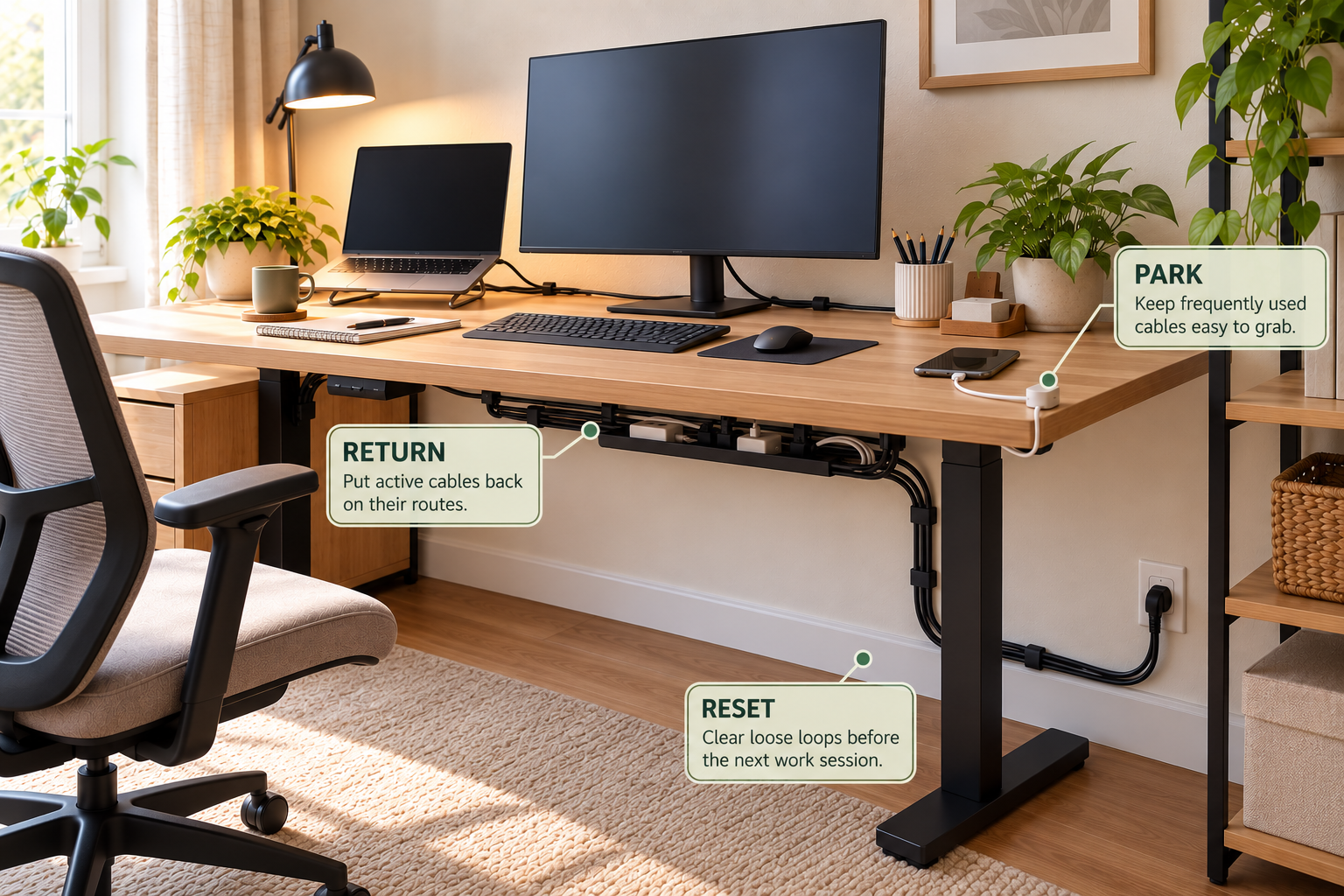
Create a Simple Daily Cable Reset
Cable organization should not require a complete reorganization every evening. A useful system makes the reset small enough to become routine.
RETURN
Put active cables back on their assigned routes after moving equipment.
PARK
Return frequently used charging cables to their easy-access parking point.
RESET
Clear loose loops and keep the floor and workspace free of unnecessary cable movement.
Frequently Asked Questions
How do I organize cables in a home office?
Audit your cables first, remove unused cords, sort the remaining cables by how they are used, then create deliberate desk, under-desk, and outlet routes. Contain the power area, identify important cables, store backups separately, and create a simple reset routine.
What is the best way to organize desk cables?
The best approach depends on the cable’s job. Frequently moved cables need easy access and retention. Permanent cables can follow fixed routes. Several cables traveling together can share a controlled route, while spare cables should leave the active workspace.
How should I route cables under a desk?
Start by identifying where the cables originate and where they need to end. Group cables that share a route, control excess slack, and keep the power area in a defined location. Avoid allowing cables to spread across the floor or interfere with normal movement.
Where should I put a power strip in a home office?
Give the power strip a defined, accessible location that keeps unnecessary cable length controlled. An under-desk cable-management tray can be useful when the desk and power arrangement allow it.
How do I stop charging cables from falling behind my desk?
Give frequently used charging cables an easy-access parking point near the part of the desk where they are used. A simple retention solution can keep the cable from dropping behind the desk without permanently fixing a cable that needs to move.
How should I organize extra computer cables?
Separate spare cables from active cables. Identify unusual cables, group similar backups together, and store them in a dedicated location so they do not compete with the cables currently connected to your equipment.
Related Home Office Guides
A tidy cable system is a routing system, not just a bundle.
Remove what you do not need, give every active cable a route, contain the power area, separate backups, and make the daily reset simple enough to repeat.