
A small home office works better when every part of the space has a clear job. Start by measuring what you actually have, remove items that do not belong, create simple work zones, and add storage only when it solves a specific problem.
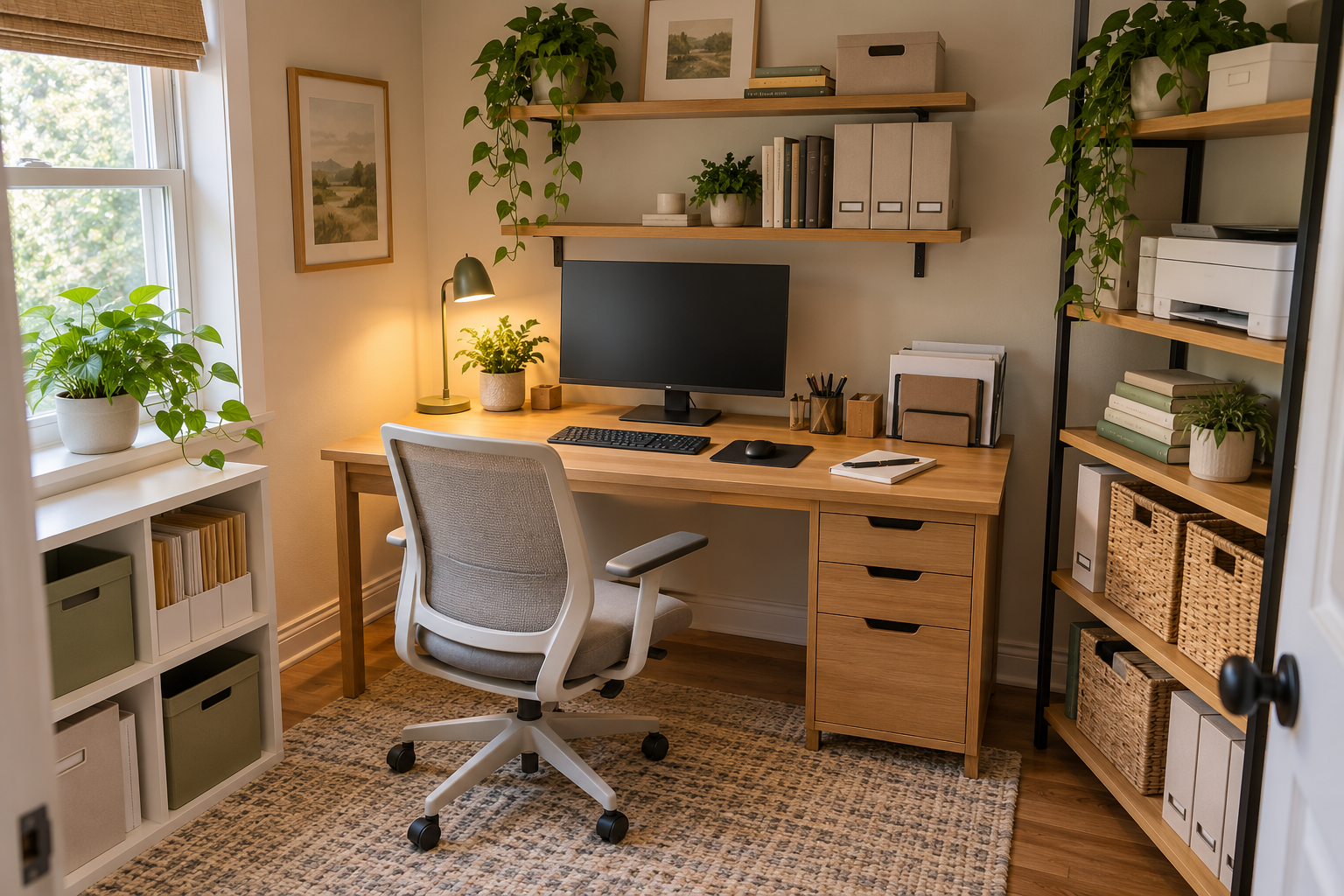
Organize a small home office by measuring the usable space, clearing items that do not belong, assigning each area a job, using vertical space carefully, protecting your working area, and keeping less-used items farther from the desk. The goal is not to fill every available space. The goal is to make the office easier to work in and easier to reset.
The Small Home Office System
IN THIS GUIDE
Why Small Home Offices Become Difficult to Organize
The problem is usually not a lack of containers. It is a lack of clearly assigned space.
In a small office, the desk can quickly become a storage surface. Papers, notebooks, chargers, pens, files, and miscellaneous items begin competing with the space you actually need for work.
Adding furniture can create another problem. A cabinet or storage unit may add capacity while taking away valuable floor space.
The same thing can happen under the desk. An empty area can look like an opportunity for storage, but filling it can make the workspace harder to use.
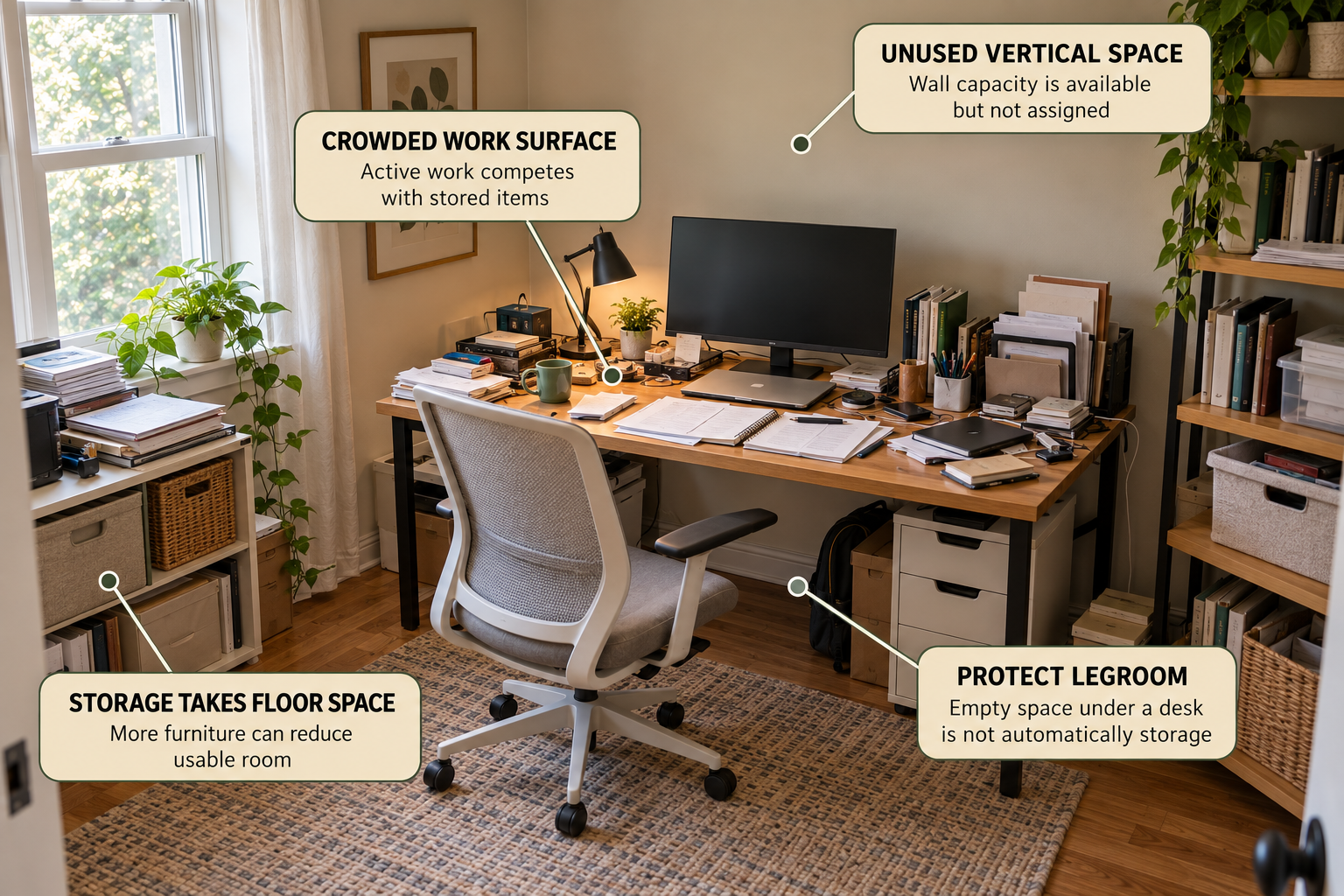
START WITH THE CONSTRAINT
Before buying storage, identify what is actually causing the problem. Is the desk crowded? Is paperwork taking over? Is the floor too full? Is useful wall space being ignored? Or are items simply missing a defined home?
1. Measure the Space Before Adding Storage
Measure first. This prevents you from buying an organizer that technically fits but makes the room harder to use.
Check the usable:
- Desk width and depth
- Available wall width and height
- Under-desk width, height, and depth
- Clear floor space around the chair
- Door and window clearance
- Available space near the desk
- Outlet locations and cable paths
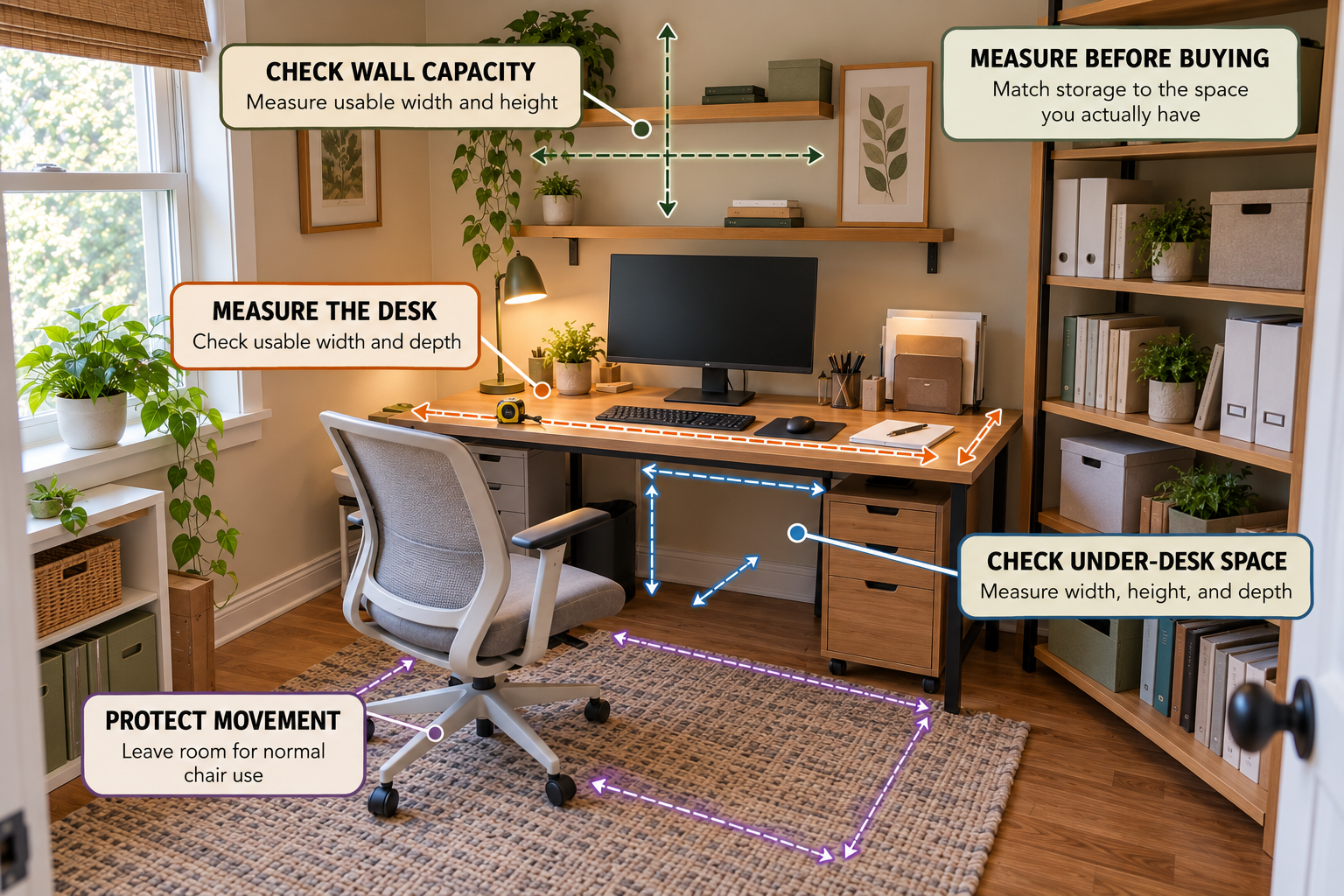
Measure the usable space, not just the room.
A wall may be wide enough for storage but unsuitable because of a door, window, outlet, or installation limitation. Under-desk space may look empty but still need to remain open for normal chair movement.
2. Clear the Workspace Before Organizing It
Remove everything from the desk that does not need to stay there.
Sort items into five simple groups:
- Daily use: items you reach for during normal work.
- Regular use: items needed during the week but not every hour.
- Occasional use: items that can live farther away.
- Reference or archive: items that need to be kept but are rarely accessed.
- Belongs elsewhere: items that should not occupy office storage at all.
This step matters because organization cannot compensate for too much inventory. If everything remains within easy reach, the office will continue to feel crowded even after you add storage.
3. Give Each Part of the Office a Job
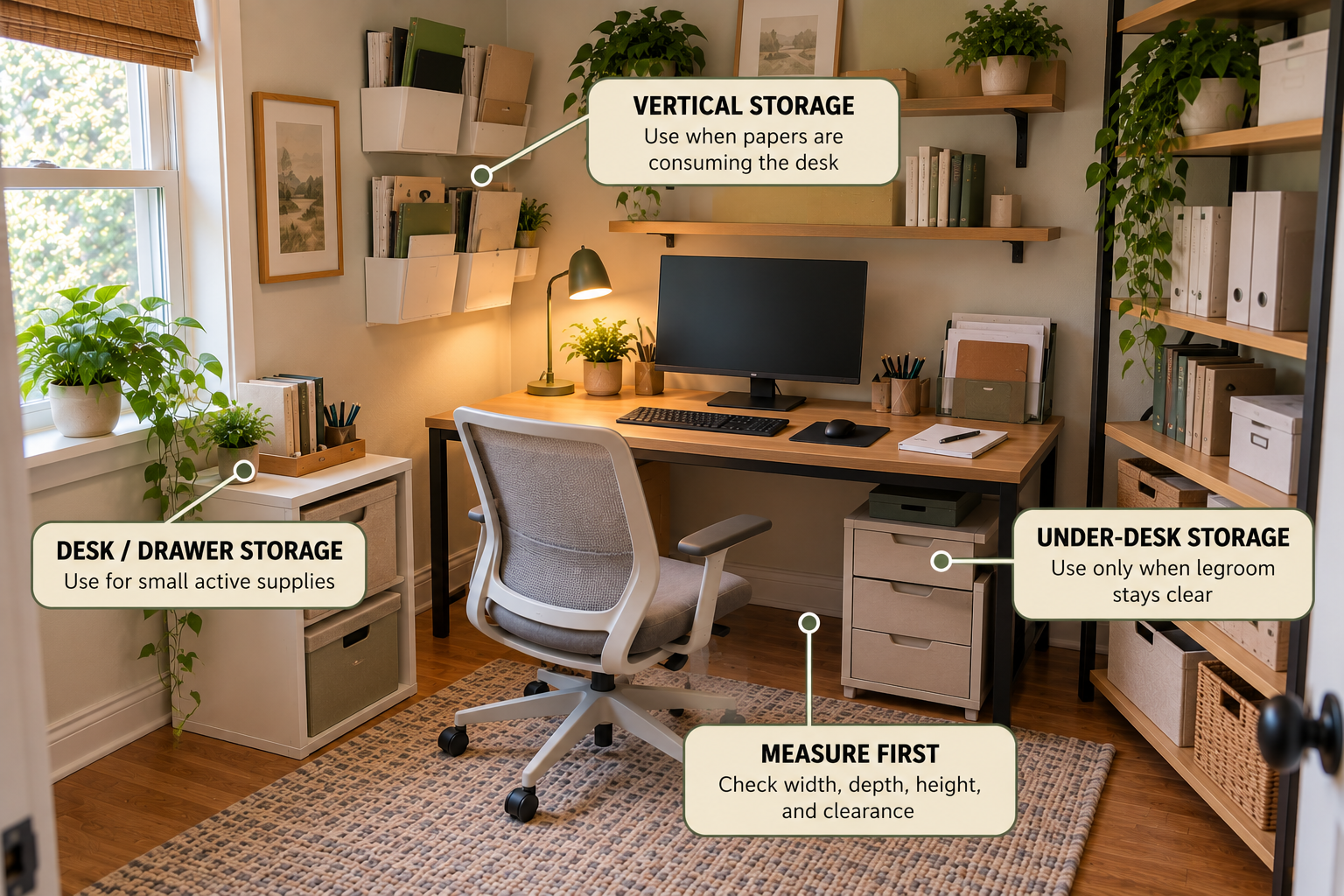
A small office does not need a large number of storage zones. It needs a few clear ones.
Work Surface
Keep the desk focused on active work. Items you use constantly should be easiest to reach.
Nearby Storage
Use drawers, a compact cabinet, or another nearby location for items you use regularly.
Vertical Storage
Use suitable wall space for papers, folders, or selected supplies when the wall can support the storage.
Under-Desk Storage
Use this area only when storage does not interfere with comfortable chair and leg movement.
Reference and Archive
Put less frequently used materials farther from the main work zone so daily items remain easy to reach.
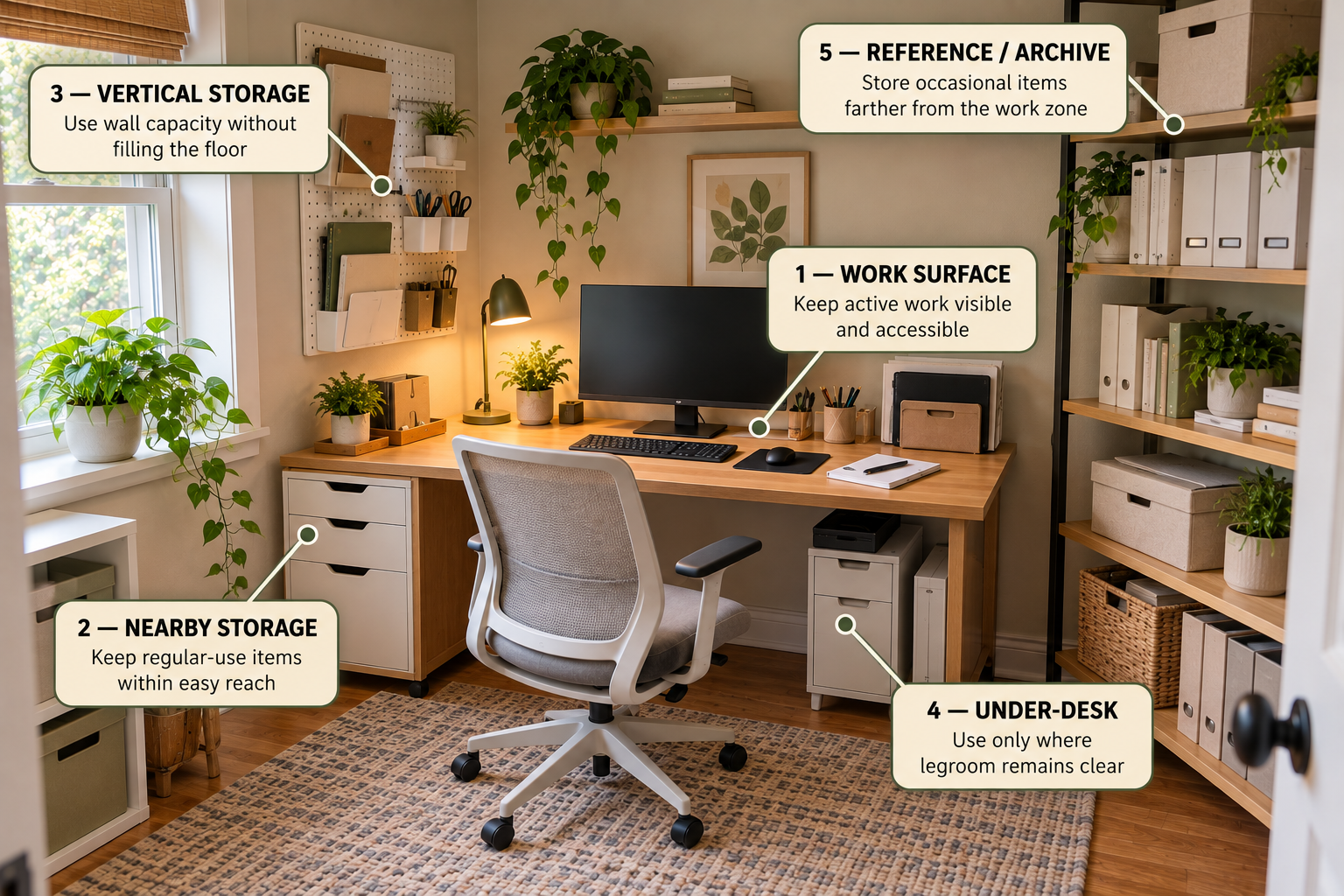
The zones are a framework, not a shopping list.
Start with the work surface.
Protect the area you actually use to work.
Add nearby storage only where useful.
Keep regular-use items accessible without covering the desk.
Use vertical space when it solves a real constraint.
Do not fill the wall simply because space is available.
Protect movement space.
Some empty areas have an important job.
4. Keep the Desk for Active Work
The desk is usually the most valuable working surface in a small office. Protect it.
DESK RULE
If an item is not part of the work you are doing now, ask whether it needs to occupy the work surface.
This does not mean your desk needs to look empty. A monitor, keyboard, notebook, lamp, and a few frequently used supplies may all belong there.
The problem starts when the desk becomes the permanent home for every category in the room.
5. Use Vertical Space Before Adding More Floor Furniture
When floor space is limited, look at the walls before adding another piece of furniture.
Vertical storage can be useful for papers, folders, reference material, and selected supplies. But the wall should be treated as another storage zone, not an invitation to fill every empty surface.
Before installing anything, check the wall, mounting method, available height, access, and the amount of material you actually need to store.
6. Use Under-Desk Space Without Losing the Workspace
Under the desk is useful only when it remains compatible with the way you work.
Avoid turning the entire area into a storage cabinet. Leave the space needed for your chair and normal leg movement.
If under-desk storage makes the workstation feel cramped, move the category somewhere else instead of forcing storage into the space.
An empty floor or under-desk area may be part of the workspace. Protect it when it supports movement, access, or comfortable use.
7. Store Items by How Often You Use Them
Frequency should influence storage location.
| Use frequency | Storage position | Why |
|---|---|---|
| Daily | Desk or closest storage | Keep everyday work items easy to reach. |
| Regular | Nearby drawer, shelf, or cabinet | Accessible without occupying the main work surface. |
| Occasional | Higher, farther, or less central storage | Protect prime storage for everyday work. |
| Archive | Least-accessible suitable area | Keep stored material away from active work. |
This hierarchy prevents an archive folder from receiving the same prime storage position as the notebook or supplies you use every day.
8. Match the Storage to the Actual Problem
Only after measuring, clearing, and assigning zones should you consider an organizer.
THE PROBLEM
Papers or small supplies are consuming valuable workspace.
THE DECISION
Choose storage according to where the category belongs and how often you need it. If no storage option fits without creating another constraint, reduce or relocate the inventory instead.
VERTICAL PAPER STORAGE
SUPEASY 13-Tier Hanging Wall File Organizer
A wall-mounted file organizer with multiple tiers and hooks. It can provide a dedicated vertical zone for papers and folders when suitable wall space is available.
Best fit: Papers and folders that are taking over the desk.
Before buying: Check the available wall space, mounting requirements, access, and the amount of paper you actually need to store.
View the SUPEASY 13-Tier Wall File Organizer on Amazon (paid link)
COMPACT WORKSTATION STORAGE
OPNICE 2-Tier Computer Monitor Stand Riser with Drawer
A compact workstation organizer that combines a monitor stand with two-tier storage, a drawer, and pen holders.
Best fit: Small active supplies and papers that need a defined home at the workstation.
Before buying: Check that the resulting monitor position works for your setup and that the stand still leaves enough usable work surface.
View the OPNICE 2-Tier Monitor Stand Organizer on Amazon (paid link)
BEFORE YOU BUY
- Measure the space first.
- Identify the category the organizer is supposed to solve.
- Check whether the storage consumes valuable workspace.
- Make sure the storage location remains easy to access.
- Do not buy storage for items that should simply be removed or relocated.
As an Amazon Associate I earn from qualifying purchases. Some links below are paid links, which means Simply Tidy Home may earn a commission if you purchase through them, at no additional cost to you.
9. Give Papers, Supplies, Electronics, and Books Separate Jobs
A small office becomes easier to manage when different categories do not compete for the same storage space.
Papers need a paper system. Small supplies need compact containment. Books need a shelf or reference area. Electronics and chargers need a controlled location rather than spreading across the desk.
You do not need a separate organizer for every category. Start by asking whether the category is active, regular, occasional, or archival.
- Active papers: keep close enough to use without creating desk clutter.
- Reference papers: store farther away when they are not needed daily.
- Small supplies: group similar items so they have one predictable home.
- Books: keep frequently used titles accessible and move reference material farther away.
- Electronics: give chargers and accessories a defined location instead of allowing them to spread across the workspace.
If you are also working with limited storage elsewhere in the home, the same constraint-first approach appears in our guide to organizing a small bedroom with limited storage.
10. Use the One-Item Retrieval Test
A storage system can look organized and still work badly.
Test it by choosing one item you use regularly.
THE TEST
Can you take out the item you need without moving several other things first?
WHAT IT TELLS YOU
If retrieval requires moving several other items, the storage location, category assignment, or amount of stored material needs to change.
Repeat the test with a paper, a small supply, and another frequently used item. The goal is not perfect appearance. The goal is predictable access.
11. Avoid These Small Home Office Organization Mistakes
- Buying storage before measuring. The organizer may fit the category but not the space.
- Using the desk as permanent storage. This slowly removes the main working surface.
- Filling every wall. Vertical space is useful, but it should remain intentional.
- Using under-desk space automatically. Empty legroom may be part of the workspace.
- Keeping archive material in prime storage. Less-used items do not need the easiest access.
- Creating too many categories. A system that is difficult to remember will be difficult to maintain.
- Buying organizers for items that should leave the room. Storage should not become a substitute for editing.
- Ignoring the reset. Even a good layout needs a simple way to return items after use.
12. Build a Small Home Office Reset System
The final step is making the system easy to repeat.
At the end of a work session, return completed papers to their assigned location, put small supplies back, clear items that do not belong on the desk, and restore the floor and chair area.
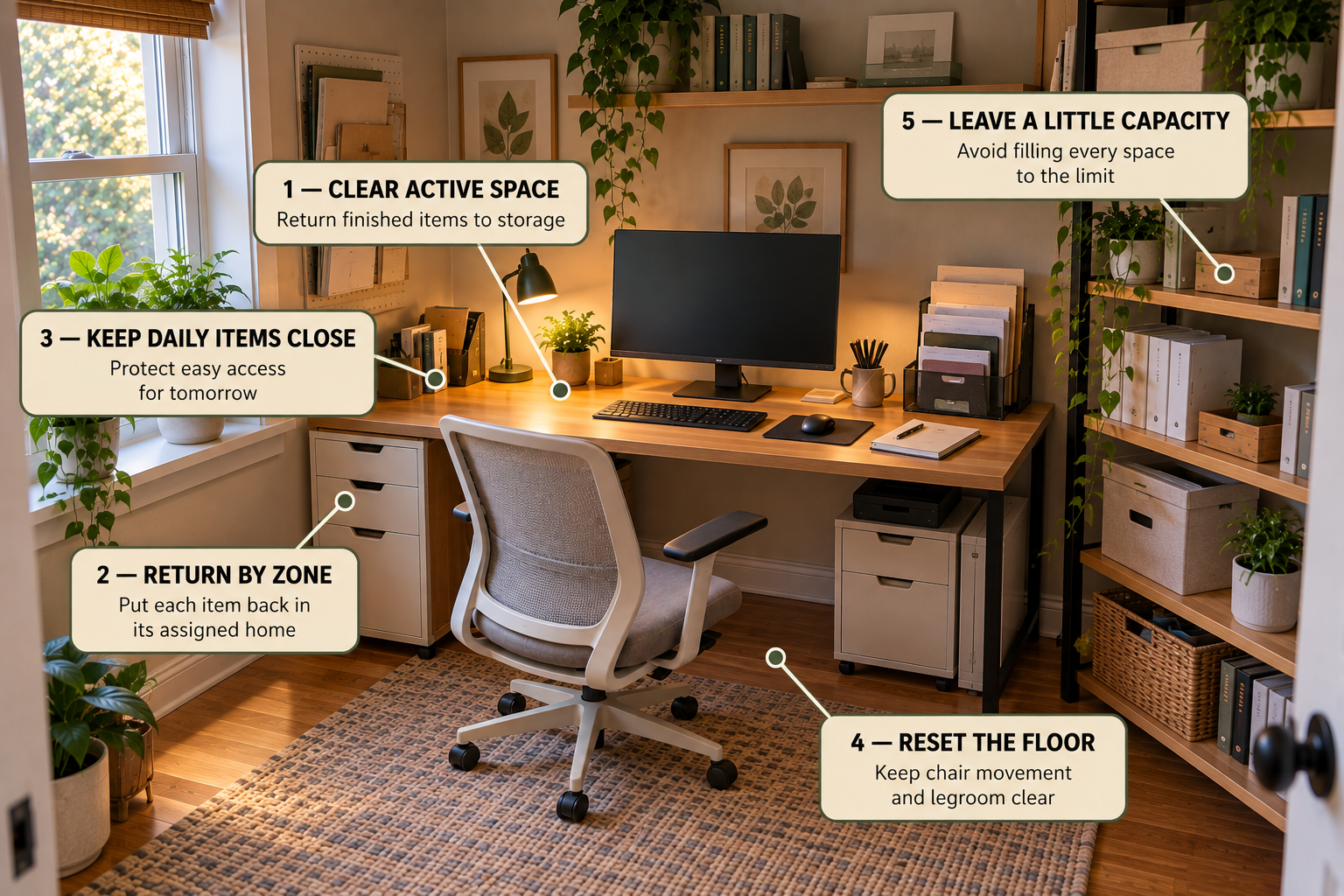
1. Clear
Remove finished work and items that do not belong on the active surface.
2. Return
Put papers and supplies back into their assigned zones.
3. Protect
Keep chair movement, legroom, and enough storage capacity ready for the next session.
Small Home Office Decision Flow
Choose the next action from the actual constraint.
Is the desk crowded?
Remove items that are not part of active work, then give the remaining categories defined storage.
Is floor space limited?
Look for suitable vertical or nearby storage before adding another floor-standing piece.
Is suitable wall space available?
Measure it before choosing wall storage and check access and installation requirements.
Is the area under the desk empty?
Keep it open if storage would interfere with normal chair or leg movement.
Are papers the main problem?
Give papers their own storage zone instead of allowing them to spread across the work surface.
Does the system survive a normal workday?
Apply the one-item retrieval test and use the short reset routine.
Frequently Asked Questions
How do I organize a very small home office?
Start by measuring the usable space and removing items that do not belong. Then assign jobs to the desk, nearby storage, vertical space, and any suitable under-desk area. Keep daily-use items closest to the work surface and move occasional or archival items farther away.
How can I maximize space in a small home office?
First reduce unnecessary inventory. Then use the available wall and nearby storage carefully. Avoid adding furniture simply because there is an empty area. Some empty floor and under-desk space needs to remain open for working and movement.
What should I keep on my desk?
Keep items that support your current work or that you use very frequently. Papers, supplies, and equipment that are used less often can usually move to nearby or vertical storage.
How can I add storage without making a small office feel crowded?
Measure before buying and consider vertical storage or compact nearby storage where appropriate. Choose storage according to the problem it solves rather than trying to fill every available space.
What should go under my desk?
Only items that can be stored there without interfering with normal chair and leg movement. An empty under-desk area is not automatically wasted space.
How do I keep a small home office organized?
Give each category a predictable home and use a short reset routine after work. If items repeatedly collect on the desk, treat that as evidence that the storage assignment needs to change.
Related Guide
The goal is not to use every inch.
A well-organized small home office protects the space you actually need to work. Measure first, remove what does not belong, assign clear zones, use storage selectively, and make the reset easy enough to repeat.